Showcase Your MCP via Playground: Delight Developers & Convince Decision-Makers

Give every prospect a live, no-risk MCP playground that lets them feel your MCP endpoints in minutes, understand the fit for their AI use-case, and plug in from any supported client.

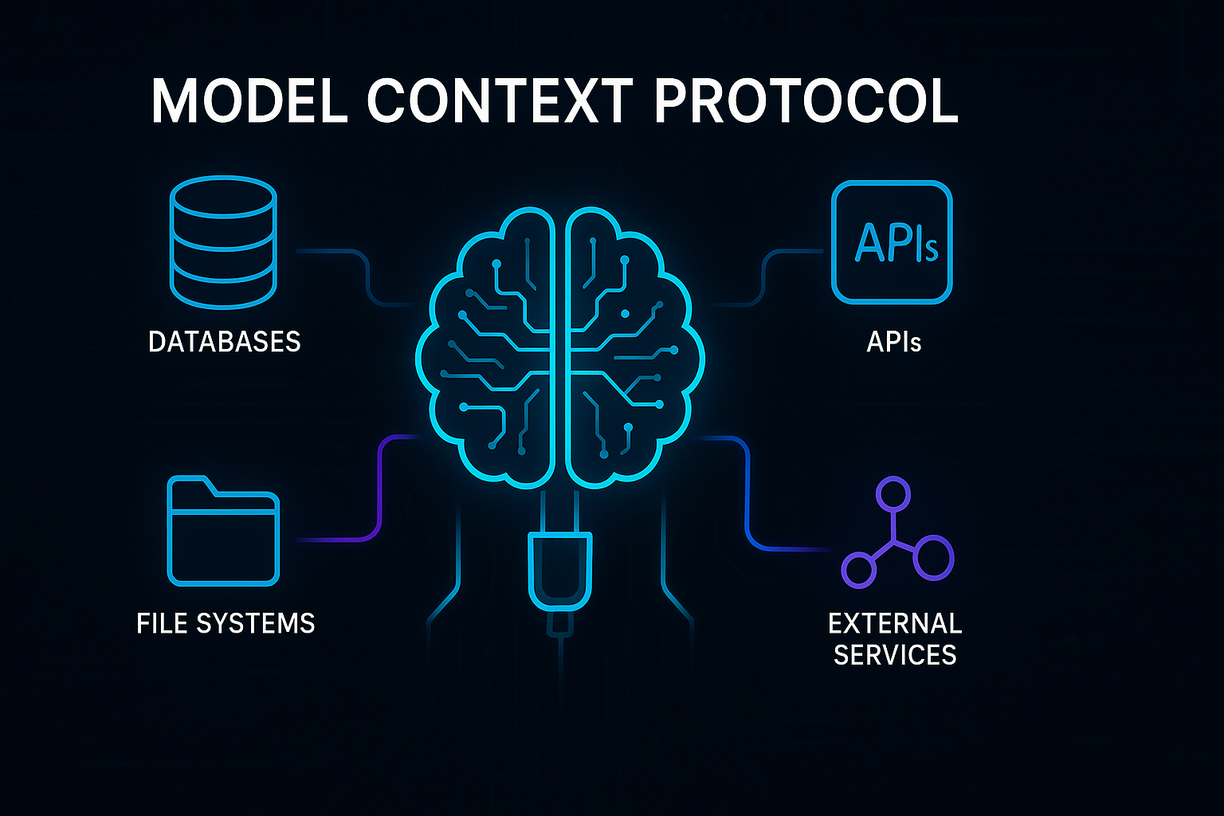
What is MCP?
new_releases
Faster Onboarding
task
Developer Delight
monitoring
Accelerate learning & adoption

Real-time feedback helps prospects understand your MCP API faster than static docs ever could.

new_releases
Bridge the buyer-developer gap

Let non-technical stakeholders "see it work", shrinking the last mile of the sales funnel.

wind_power
Empower your product team

Get real-time insights from how prospects use your MCP playground. Refine features and MCP quality in days, not weeks.

Launch-Ready MCP Sandbox

Spin up an isolated MCP playground for your MCP server in less than five minutes. No DevOps tickets required.

  • check_circle Mocked data
  • check_circle SSE and streamable HTTP supported
  • check_circle Automatic MCP introspection
Start for Free arrow_forward

Interactive Docs & MCP Chat

Keep stakeholders and engineers in flow while they explore your MCP (Model Context Protocol) tools.

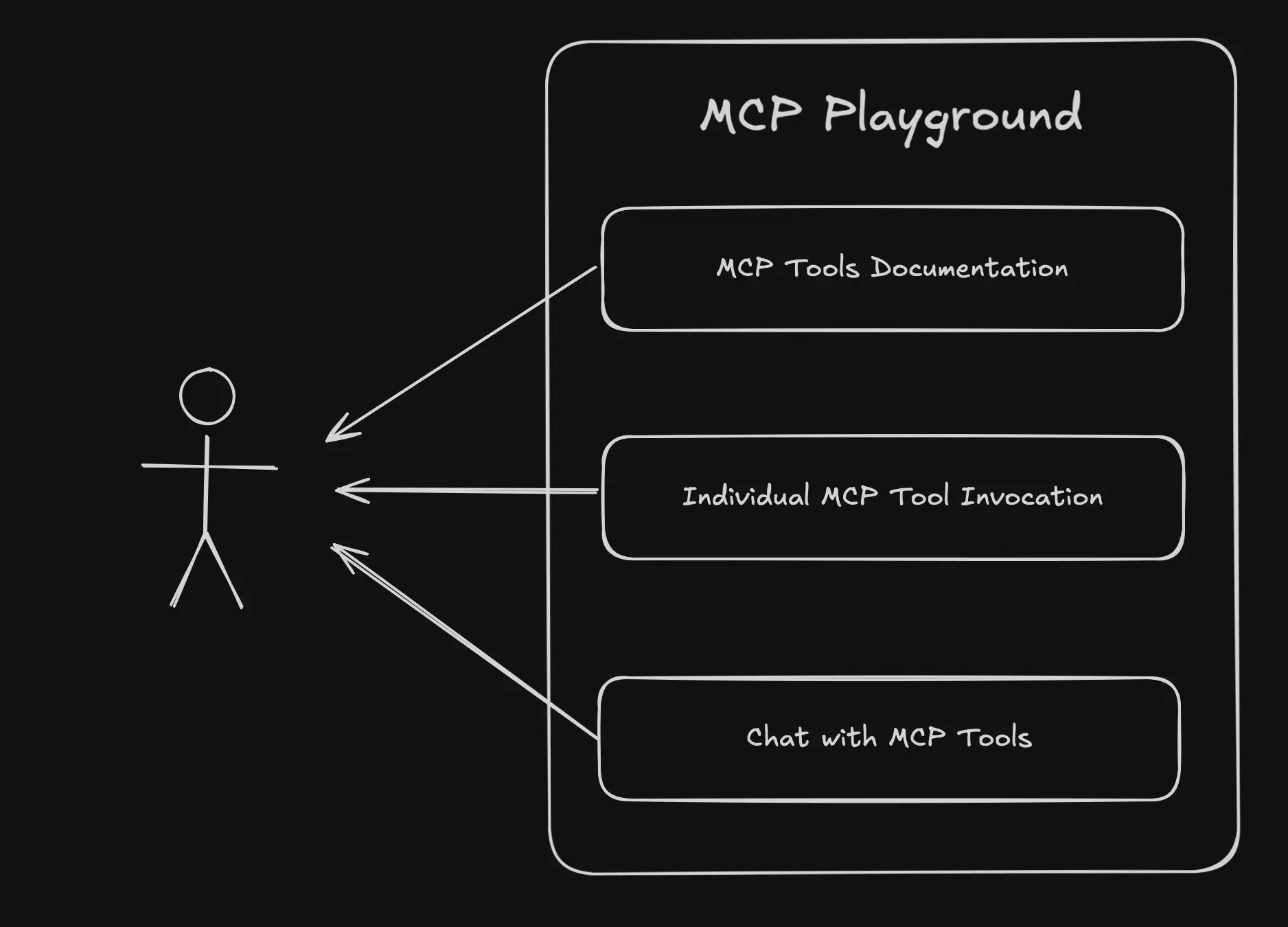
  • check_circle Generated documentation for MCP tools
  • check_circle Sample chat history for easier understanding
  • check_circle Interactive chat connected to MCP tools
Book a demo arrow_forward

MCP Playground Demo

Explore the MCP server below. You can embed similar MCP playground into your website or app. It's included in our free plan.

Context7 MCP - Up-to-date Code Docs For Any Prompt

Try comparing the experience of exploring the official site and its documentation with the MCP playground below.

Widget generated by MCP Showcase

Explore More MCP Playgrounds

Tavily Logo
Tavily MCP Server
https://www.tavily.com/
Tavily provides a web access layer built specifically for AI agents and applications, offering one secure API for real-time web access. Trusted by over 2 million developers and used by enterprises like MongoDB, IBM, AWS, and JetBrains, Tavily grounds language models with fresh, structured web context to help agents reason over facts without hallucinating. This MCP server exposes Tavily's core capabilities through five complementary tools: **search** for retrieving current web information, **extract** for pulling clean content from specific URLs, **crawl** for exploring websites with configurable depth and breadth, **map** for discovering a website's structure, and **research** for conducting comprehensive multi-source investigations. Together, these tools enable AI agents to fetch live data, parse and structure web content, and perform deep research—all backed by a production-grade retrieval stack featuring built-in safeguards against PII leakage, prompt injection, and malicious sources. With 300M+ monthly requests handled and 99.99% uptime, Tavily is engineered for reliability at scale. ## Use Cases **1. Real-time factual search and news lookup** Use `tavily_search` to retrieve up-to-date information on any topic that falls beyond a model's knowledge cutoff, with control over recency, domains, and geographic relevance. - Sample prompt: `Search for the latest news on OpenAI's product announcements from the past week and give me the source URLs.` **2. Extracting content from specific web pages** Use `tavily_extract` to pull clean, structured markdown or text content from one or more known URLs, including protected sites, LinkedIn, or pages with tables. - Sample prompt: `Extract the full article content from these three URLs and summarize the key points from each.` **3. Crawling a website for documentation or research** Use `tavily_crawl` to systematically explore a site starting from a root URL, gathering content across multiple pages with defined depth and path filters. - Sample prompt: `Crawl the docs.stripe.com site and collect all pages under the /payments path, then summarize their API authentication requirements.` **4. Mapping a website's structure** Use `tavily_map` to generate a list of all URLs reachable from a base URL, useful for site audits or planning a targeted crawl. - Sample prompt: `Map the entire structure of https://www.example.com and show me all the pages under the /blog section.` **5. Comprehensive multi-source research** Use `tavily_research` to conduct deep investigations across many sources and receive a detailed synthesized response, ideal for broad or complex questions. - Sample prompt: `Research the current state of the electric vehicle battery market, including major manufacturers, recent breakthroughs, and projected growth through 2030.` **6. Competitive and market intelligence (combined tools)** Combine `tavily_search` and `tavily_extract` to first discover relevant competitor pages, then extract detailed content for analysis. - Sample prompt: `Find the pricing pages for the top 3 project management SaaS tools, extract their pricing tiers, and build a comparison table.` **7. Country-specific and time-bound fact checking** Use `tavily_search` with country and date-range filters to verify claims or gather region-specific data within a defined time window. - Sample prompt: `Search for renewable energy policy changes in Germany between 2024-01-01 and 2024-12-31 and list the key legislative updates.` **8. Building a knowledge base from a domain (combined tools)** Combine `tavily_map` and `tavily_crawl` to first map a site's structure, then crawl selected sections to ingest content into a knowledge base. - Sample prompt: `Map the help center at support.myproduct.com, then crawl all the troubleshooting articles so I can build an internal FAQ dataset.`
Microsoft Logo
Microsoft Learn MCP Server
https://learn.microsoft.com/en-gb/
The **Microsoft Learn MCP Server** provides AI-powered access to official Microsoft and Azure documentation, enabling assistants to ground their answers in accurate, first-party knowledge. It connects directly to Microsoft Learn and other trusted Microsoft sources, ensuring responses are always based on the latest official content. The server offers three complementary tools focused on documentation retrieval and code assistance. These include searching documentation for relevant content chunks, fetching complete webpages in markdown format, and retrieving official code samples for Microsoft/Azure development tasks. Together, these tools help developers, IT professionals, and learners get trustworthy answers, step-by-step guidance, and practical code examples across the entire Microsoft ecosystem—including Azure, .NET, Microsoft 365, and Copilot technologies. ## Use Cases ### 1. Grounding answers in official Microsoft documentation Quickly search across Microsoft Learn to find relevant, accurate content for any Microsoft/Azure question, ensuring responses reflect first-party knowledge. - Sample prompt: `How do I configure managed identities for an Azure App Service to access Azure Key Vault?` ### 2. Retrieving complete tutorials and step-by-step guides When a search result is truncated or highly relevant, fetch the full documentation page to get comprehensive procedures, prerequisites, and troubleshooting details. - Sample prompt: `Give me the complete step-by-step tutorial for deploying a containerized app to Azure Kubernetes Service, including all prerequisites.` ### 3. Generating code with the latest official samples Retrieve up-to-date, official code snippets when writing Microsoft/Azure related code, filtered by your preferred programming language. - Sample prompt: `Show me a C# code sample for uploading a file to Azure Blob Storage using the latest Azure.Storage.Blobs SDK.` ### 4. Comparing services and making architecture decisions Search documentation to understand differences between Microsoft services and get authoritative guidance for architectural choices. - Sample prompt: `What's the difference between Azure Functions and Azure Logic Apps, and when should I use each based on official Microsoft guidance?` ### 5. Troubleshooting errors with authoritative sources Search and fetch detailed troubleshooting sections from Microsoft docs to resolve specific errors or configuration issues. - Sample prompt: `I'm getting a "403 Forbidden" error when calling the Microsoft Graph API. Find the official troubleshooting steps to fix this.` ### 6. Learning SDK and API usage patterns Combine documentation search with code sample retrieval to fully understand how to use a specific SDK, class, or method. - Sample prompt: `Explain how to use the Azure OpenAI Python SDK to create chat completions, and include a working code example.` ### 7. PowerShell and Azure CLI automation scripting Retrieve official command-line samples for automating Azure resource management and administrative tasks. - Sample prompt: `Give me a PowerShell script to create a new Azure resource group and deploy a virtual machine into it using official examples.` ### 8. Exploring new Microsoft features and best practices Search the latest documentation to stay current with new capabilities and recommended best practices across Microsoft products. - Sample prompt: `What are the current best practices for securing a .NET 8 web API with Microsoft Entra ID authentication?`
GitHub Logo
Github MCP Server
https://github.com/github/github-mcp-server
The GitHub MCP Server is GitHub's official Model Context Protocol server, designed to connect AI assistants and agents directly to GitHub's platform. It exposes a comprehensive set of tools that allow language models to interact with repositories, issues, pull requests, files, branches, releases, and teams programmatically. This server enables end-to-end software development workflows, from creating and managing repositories to handling code reviews and collaboration. The available tools cover repository management (creating repos, branches, and files), issue tracking (creating, updating, and commenting on issues), pull request review workflows (adding review comments, replies, and reactions), and organizational context (retrieving teams, members, and authenticated user details). Maintained by GitHub and released under the MIT license, the server supports read-only and lockdown modes for security-conscious environments and is highly configurable. It serves as a powerful bridge for automating and streamlining common developer operations through natural language. ## Use Cases ### 1. Repository Setup and Management Quickly bootstrap new projects by creating repositories, initializing files, and setting up branches without leaving your AI assistant. - Sample prompt: `Create a new private repository called "payment-service" in my organization "acme-corp", initialize it with a README, and add a description saying "Handles payment processing".` ### 2. File Operations and Content Management Create, update, retrieve, or delete files directly in a repository, useful for configuration changes or quick edits. - Sample prompt: `Update the file "config/settings.yaml" on the "develop" branch of acme-corp/payment-service to change the timeout value to 30 seconds, and commit it with the message "Increase timeout".` ### 3. Issue Tracking and Triage Create, update, and organize issues, including assigning labels, milestones, assignees, and managing sub-issue hierarchies. - Sample prompt: `Create a new issue in acme-corp/payment-service titled "Fix null pointer in checkout flow", assign it to user "janedoe", add the labels "bug" and "priority-high", and set the body describing the crash on the payment confirmation page.` ### 4. Pull Request Creation and Review Open pull requests, request reviewers, and add detailed line-by-line review comments on the diff to facilitate code review workflows. - Sample prompt: `Create a pull request in acme-corp/payment-service from branch "feature/retry-logic" into "main" titled "Add retry logic for failed payments", and request review from "senior-dev-team".` ### 5. Code Review Comments and Feedback Add pending review comments, reply to existing comments, and react to feedback on specific lines of code. - Sample prompt: `On pull request #42 in acme-corp/payment-service, add a review comment on line 85 of "src/checkout.js" on the RIGHT side saying "This should handle the timeout exception explicitly".` ### 6. Issue and PR Collaboration Add comments and emoji reactions to issues and pull requests to keep discussions moving and acknowledge contributors. - Sample prompt: `Add a comment to issue #17 in acme-corp/payment-service saying "I've reproduced this bug and will have a fix by tomorrow", and add a rocket reaction to the issue itself.` ### 7. Release and Tag Inspection Retrieve the latest releases, specific releases by tag, or git tag details to track versioning and deployment history. - Sample prompt: `Get the latest release for acme-corp/payment-service and show me its release notes and tag name.` ### 8. Commit and Change Investigation Fetch detailed commit information, including file-level stats or full diffs, to understand changes and troubleshoot regressions. - Sample prompt: `Show me the full patch details for commit abc123def in acme-corp/payment-service so I can see exactly what changed in the checkout module.` ### 9. Repository Forking and Branching for Contribution Fork repositories and create feature branches to contribute to open-source or team projects. - Sample prompt: `Fork the repository octocat/hello-world to my account, then create a new branch called "fix-typo" from the main branch.` ### 10. Team and Organization Context Retrieve team memberships and member lists to understand organizational structure and route reviews or assignments appropriately. - Sample prompt: `List all the teams I'm a member of, and then show me the members of the "backend-engineers" team in the "acme-corp" organization.` ### 11. Label Management and Standardization Fetch label details to keep issue categorization consistent across a repository. - Sample prompt: `Get the details of the "priority-high" label in acme-corp/payment-service including its color and description.` ### 12. Authenticated User Profile Lookup Retrieve details of the authenticated user to personalize actions or auto-fill ownership information in other operations. - Sample prompt: `Who am I logged in as? Get my GitHub profile details and list the repositories I own.`
HuggingFace Logo
HuggingFace MCP Server
https://huggingface.co/mcp
The **Hugging Face MCP Server** connects AI assistants to Hugging Face's vast ecosystem of machine learning resources, including models, datasets, spaces (AI applications), research papers, and documentation. As an open-source offering from Hugging Face, this server provides a secure, standardized bridge between conversational AI clients and the Hub's rich collection of state-of-the-art AI tools and content. The server exposes tools for authenticated identity checks, powerful repository search, detailed repository inspection, and a flexible filesystem-style navigation interface. Together, these tools let assistants discover trending models, preview datasets, explore AI spaces, and read research papers—all through simple, structured queries. Whether you're browsing the latest text-generation models, inspecting a dataset's schema before use, or reading through a paper's content, the Hugging Face MCP Server makes the entire Hub programmatically accessible to your AI workflows. ## Use Cases **1. Discovering Trending and Relevant Models** Search across models, datasets, and spaces with filtering by author, tags, popularity, and recency to find exactly what you need. - Sample prompt: `Find me the top 10 most downloaded text-generation models from Meta on Hugging Face, and include links to each repository.` **2. Exploring and Previewing Datasets** Inspect dataset structure to discover configs, splits, and schema, then preview actual rows before committing to a download or fine-tuning task. - Sample prompt: `Show me the structure of the 'squad' dataset, then preview the first 5 rows of the training split.` **3. Getting Detailed Model Information** Retrieve overviews for one or more repositories to compare capabilities, licenses, and specifications side by side. - Sample prompt: `Give me the details and overview for openai/gpt-oss-120b and meta-llama/Llama-3-70B so I can compare them.` **4. Finding AI Applications (Spaces)** Use semantic search and tag filtering to locate ready-to-use AI apps and demos, including MCP-server spaces. - Sample prompt: `Search Hugging Face Spaces for text-to-image generation apps and show me the most trending ones.` **5. Reading Research Papers** Navigate to papers by arXiv ID to discover related resources and read the full paper content or metadata directly. - Sample prompt: `Pull up the paper with arXiv ID 1706.03762 and summarize its key contributions for me.` **6. Browsing Trending Content** List trending models, datasets, spaces, or papers to stay current with the latest developments in the AI community. - Sample prompt: `What are the top trending datasets on Hugging Face right now?` **7. Navigating Repository Files** Use filesystem-style commands (ls, cat, stat, find) over hf:// URIs to explore repository contents, read config files, or locate specific files. - Sample prompt: `List all the files in the mistralai/Mistral-7B-v0.1 model repository and show me the contents of its config.json.` **8. Searching Documentation** Query Hugging Face's product documentation to find guidance on transformers, datasets, or other libraries. - Sample prompt: `Search the Hugging Face Transformers documentation for how to use the Trainer API.` **9. Author-Scoped Discovery** Filter searches to a specific organization or user to survey their entire catalog of contributions. - Sample prompt: `Show me all the datasets published by the 'google' organization on Hugging Face, sorted by likes.` **10. Verifying Authentication Context** Confirm the identity of the authenticated user driving Hub interactions. - Sample prompt: `Which Hugging Face account am I currently authenticated as?`
Teamwork Logo
Teamwork MCP Server
https://teamwork.com
This MCP server connects to **Teamwork.com**, an AI-powered professional services automation platform that helps agencies, consultancies, IT service providers, and other client-focused businesses run projects, resources, and financials in one place. The server exposes a comprehensive set of tools spanning the entire Teamwork.com ecosystem, enabling AI assistants to manage work end-to-end without leaving the conversation. The tools are organized into four main product areas. **Teamwork Projects** (`twprojects-*`) covers the core project management surface — projects, tasks, tasklists, milestones, comments, messages, notebooks, links, time tracking (timelogs and timers), workflows, custom fields, custom item types, budgets, teams, users, tags, skills, and workload reporting. **Teamwork Desk** (`twdesk-*`) handles customer support with tickets, inboxes, customers, companies, priorities, statuses, ticket types, help doc articles, and agents. **Teamwork Chat** (`twchat-*`) provides messaging capabilities including conversations, direct messages, and people lookup, while **Teamwork Spaces** (`twspaces-*`) manages a knowledge base of collaborative pages, comments, categories, tags, and spaces. Together these tools let you create, read, update, search, and report across the full Teamwork.com suite — from logging billable time to spinning up projects from templates and forecasting team workload. ## Use Cases ### 1. Project setup and cloning Quickly stand up new client projects manually or from templates, then organize tasklists and milestones. - Sample prompt: `Create a new project called "Acme Website Redesign" for the Acme company starting 2025-07-01, then add tasklists for Discovery, Design, and Development.` - Sample prompt: `Clone our "Client Onboarding Template" project into a new project called "Beta Corp Onboarding" starting today.` ### 2. Task management and delegation Create, assign, prioritize, and track tasks through completion and workflow stages. - Sample prompt: `Create a high-priority task "Finalize homepage mockups" in tasklist 48291, assign it to user 1023, due next Friday, and estimate 4 hours.` - Sample prompt: `Show me all unassigned, unplanned tasks in project 55210 and list who created each one.` ### 3. Time tracking and billable reporting Log time, run timers, and produce exact profitability-focused totals grouped by user or project. - Sample prompt: `Log 2 hours 30 minutes of billable time against task 88213 for today with the description "Client review call".` - Sample prompt: `Summarize all billable vs unbilled hours per project for the month of June 2025.` ### 4. Resource and workload planning See task allocation across the team to spot over- and under-utilization. - Sample prompt: `Show me the workload for the design team between 2025-07-01 and 2025-07-15 and flag anyone over capacity.` ### 5. Customer support ticket handling (Teamwork Desk) Triage, reply to, and update support tickets, and manage inboxes, statuses, and priorities. - Sample prompt: `Find all open high-priority tickets in the Support inbox, then reply to ticket 41022 letting the customer know a fix is on the way.` - Sample prompt: `Add an internal note to ticket 41055 assigning it to agent 88 and tag it as "escalation".` ### 6. Customer and company (client) records management Create and maintain customer and company records across both Projects and Desk. - Sample prompt: `Create a new Desk company called "Northwind Traders" with the domain northwind.com and add a customer named Jane Doe with email jane@northwind.com.` ### 7. Cross-entity and knowledge search Search across projects, tasks, files, messages, help docs, and Spaces pages. - Sample prompt: `Search all projects and tasks for anything mentioning "GDPR compliance" updated in the last month.` - Sample prompt: `Search our help docs for published articles about "password reset".` ### 8. Team communication (Teamwork Chat) Send direct messages and post to conversations, resolving people by name. - Sample prompt: `Send a direct message to Sarah Kelly letting her know the design review is moved to 3pm tomorrow.` - Sample prompt: `Post a message in the "Project Leads" conversation summarizing this week's blockers.` ### 9. Knowledge base authoring (Teamwork Spaces) Create and maintain internal documentation pages, comments, and required reading. - Sample prompt: `Create a page titled "Client Onboarding Checklist" in space 12 and publish it with our standard onboarding steps.` - Sample prompt: `Duplicate page 8842 as "2025 Style Guide" and mark it as required reading.` ### 10. Custom items for bespoke workflows Model non-standard entities like Contracts, Leads, or Deals with custom fields and records. - Sample prompt: `List the custom item types on project 55210, then add a new "Contract" record named "Acme Retainer 2025" with a value of 24000 and status Active.` ### 11. Custom fields and metadata Define and populate custom fields on tasks, projects, and companies for richer reporting. - Sample prompt: `Create a dropdown custom field called "Account Tier" with Gold, Silver, and Bronze options at the installation level, then set it to Gold on project 55210.` ### 12. Messages, notebooks, and links collaboration Centralize project discussions, reference docs, and shared resources. - Sample prompt: `Post a project message titled "Sprint 3 Kickoff" to project 55210 notifying all members, and add a link to our shared Figma board.` ### 13. Activity monitoring and status reporting Review recent activity and comments to build status updates. - Sample prompt: `Show me all activity in project 55210 over the last 7 days involving milestones and timelogs, then draft a client status summary.` ### 14. Workflow management Set up workflows and move tasks through stages for visual pipeline tracking. - Sample prompt: `Create a workflow called "Content Pipeline" with stages Draft, Review, and Published, link it to project 55210, and move task 88213 into Review.`
Hive Intelligence Logo
Hive Intelligence MCP Server
https://www.hiveintelligence.xyz
Hive Intelligence provides a managed MCP server that acts as a single connection for evidence-backed crypto due diligence. Every answer is delivered with sources, freshness context, and a runtime receipt (provider evidence time, cache age, runtime status, and a server-issued receipt ID), so agents can preserve verifiable provenance for each data point. Rather than exposing hundreds of endpoints directly, Hive uses a discover-then-execute workflow. Agents first search a catalog of canonical task toolsets and intent-based routes with `search_tools`, inspect the exact input contract with `get_api_endpoint_schema`, then run read-only queries through `invoke_api_endpoint` or approved state changes through `invoke_stateful_endpoint`. A final `validate_task_result` step checks the proposed answer against Hive's typed task-output and evidence-receipt contract. The underlying catalog spans market data, onchain activity, risk screening, and prediction markets, normalizing providers such as CoinGecko, Moralis, Tenderly, Helius, GoPlus, CCXT, Codex, Alchemy, DeFiLlama, and Hyperliquid. Its source-backed inventory covers roughly 10 category endpoints, 519 provider tools, and 18 Hive-native stateful tools, all reachable through the same bounded execution contract. ## Use Cases - **Token safety screening before signing/swapping** Combine risk tools like honeypot detection, contract risk, and rugpull signals to vet a token before any transaction. Sample prompt: `` Use Hive to screen the token at 0x1234...abcd on Ethereum for honeypot risk, contract vulnerabilities, and rugpull signals, and tell me if it's safe to research further. `` - **Live market price and stats lookups** Fetch current prices, volumes, market caps, movers, and global market stats across venues. Sample prompt: `Get me the current BTC and ETH prices in USD along with 24h volume and market cap using Hive tools.` - **Wallet portfolio and transaction history analysis** Pull token balances, transaction history, and DeFi positions for a given wallet. Sample prompt: `` Show me all token balances and the recent transaction history for wallet 0xabc...789 on Ethereum using Hive. `` - **DeFi protocol and TVL research** Inspect protocol TVL, DeFi positions, and trending liquidity pools for diligence reports. Sample prompt: `Use Hive to give me the current TVL for Aave and Uniswap, plus the top trending DEX pools right now.` - **Prediction market tracking and reporting** Discover prediction markets, monitor price movement, and aggregate trade flow for ranking or reporting. Sample prompt: `Track the top prediction markets on Codex through Hive and summarize recent trade flow and event stats for the biggest ones.` - **End-to-end due-diligence workflow with verifiable receipts** Run a full route (discover → inspect schema → execute → validate) that produces a pass/block/escalate decision backed by evidence receipts. Sample prompt: `` Run a full Hive due-diligence workflow on the PEPE token: check price, liquidity, and security risk, then give me a pass/block/escalate decision with runtime receipts for each source. `` - **DEX flow and trending pool discovery** Surface trending pools and DEX flows to spot emerging tokens or liquidity shifts. Sample prompt: `Use Hive to find the trending DEX pools on Solana in the last 24 hours and flag any with unusual liquidity changes.` - **Comparative market movers analysis** Query market data to identify top gainers and losers for agent-driven watchlists. Sample prompt: `Get the top 10 crypto gainers and losers over the last 24 hours from Hive market data with their current prices.` - **Saving and managing durable diligence state** Use Hive-native stateful endpoints (after explicit approval) to remember, acknowledge, or resolve monitoring alerts and reports. Sample prompt: `After reviewing this token risk report, save it to my Hive workspace and set an alert I can acknowledge later.` - **Validating an answer before presenting it to a user** Ensure a generated crypto answer meets citation, phase coverage, and receipt-consistency requirements before delivery. Sample prompt: `Validate my proposed token-risk answer against Hive's task-output contract and confirm each claim is backed by a proper evidence receipt.`
Ref MCP Server
https://ref.tools/
# Introduction Ref is a documentation context provider built by ref.tools that connects AI coding agents to accurate, up-to-date technical documentation through the Model Context Protocol (MCP). The company's mission is to reduce hallucinations in AI-generated code by grounding agents in real documentation rather than outdated or invented knowledge. The MCP server exposes two complementary tools focused on documentation retrieval. `ref_search_documentation` searches across public and private documentation sources—including web docs, GitHub repos, and PDFs—while `ref_read_url` reads the full content of any specific URL as clean markdown. Together, these tools enable a search-then-read workflow: agents first find relevant documentation sections, then dive deep into specific pages for complete context. This helps developers get precise, current answers about frameworks, APIs, libraries, and their own private codebases without context bloat. # Use Cases **1. Finding framework-specific implementation guidance** Search public documentation to get accurate syntax and best practices for a specific library or framework. - Sample prompt: `Search the React documentation for how to use the useEffect hook with cleanup functions and show me the correct pattern.` **2. Reading a specific documentation page in depth** After locating a relevant doc, read its full content to extract detailed information and code examples. - Sample prompt: `Read the full content of the Next.js App Router documentation page on server actions and summarize the setup steps for me.` **3. Searching private repos and internal docs** Query a team's private documentation, GitHub repos, or PDFs to ground agent work in existing conventions. - Sample prompt: `Search our private docs (ref_src=private) for our internal authentication service setup and how to configure the OAuth PKCE flow.` **4. Resolving API integration questions** Look up specific API endpoints, parameters, and authentication requirements from official service documentation. - Sample prompt: `Search the Stripe API documentation for how to create a subscription with a trial period, then read the exact endpoint reference.` **5. Debugging with accurate, current documentation** Prevent hallucinated fixes by pulling the latest official docs when troubleshooting an error. - Sample prompt: `I'm getting a "hydration mismatch" error in my Next.js 14 app. Search the docs for the cause and read the recommended solution.` **6. Comparing configuration options across versions** Search for version-specific documentation to ensure code matches the exact library version in use. - Sample prompt: `Search the Tailwind CSS v4 documentation for the new configuration format and show me how it differs from v3.` **7. Following documentation links for deeper context** Chain a search result into a full-page read to access content not surfaced in the initial search snippet. - Sample prompt: `Search the PostgreSQL docs for JSONB indexing, then read the full page on GIN indexes to explain performance tradeoffs.` **8. Onboarding to an unfamiliar codebase or tool** Search private repos and PDFs to quickly understand an internal library's usage patterns. - Sample prompt: `Search our private GitHub repo docs for how to use our internal logging SDK and read the getting-started guide.`
Exa Web Search Logo
Exa Search MCP Server
https://exa.ai/
The Exa MCP server provides AI agents with powerful web search and content extraction capabilities, built specifically for AI-driven workflows. Developed by Exa (exa.ai), this server offers one unified API for search, crawling, and research, trusted by teams at Cursor, HubSpot, Databricks, and Cognition. The server exposes two complementary tools: `web_search_exa` for finding current information across any topic using semantically rich natural language queries, and `web_fetch_exa` for reading full webpage content as clean markdown. Together, these tools enable agents to retrieve token-efficient, ready-to-use content with clean text extraction from top search results. Exa is designed to make agents smarter by providing comprehensive coverage across multiple search verticals—including general web, company, people (LinkedIn profiles), and code searches. With features like highlights for token reduction and specialized category filtering, it's ideal for grounding agent responses in accurate, current, and cited information. ## Use Cases 1. **Current Events & News Research** Agents can search for the latest developments on any topic and pull the most relevant, up-to-date information. - Sample prompt: `Find the latest news about Nvidia's newest GPU releases and summarize the key announcements from the past month.` 2. **Company & Market Research** Using the `category:company` filter, agents can research businesses, competitors, and market landscapes. - Sample prompt: `Search for European Series B fintech companies with 50+ employees that raised funding recently, and give me details on each.` 3. **People & Talent Sourcing** The `category:people` filter allows searching LinkedIn-style profiles for recruiting or networking purposes. - Sample prompt: `Find profiles of senior machine learning engineers based in San Francisco who have experience at large AI labs.` 4. **Deep Content Extraction from Specific URLs** After finding relevant results, agents can fetch full page content as clean markdown for detailed analysis. - Sample prompt: `Read the full content of this article at https://example.com/ai-report-2025 and give me a detailed breakdown of the main findings.` 5. **Fact-Checking & Answering Questions** Agents can verify claims or answer factual queries with grounded citations from top sources. - Sample prompt: `Who is the current CEO of Boeing and when was the company founded? Provide sources.` 6. **Technical Documentation & Code Research** Search across docs and repositories for token-efficient answers to programming questions. - Sample prompt: `Find documentation and code examples comparing React and Vue performance for large-scale applications.` 7. **Multi-Source Content Aggregation** Combine both tools to search broadly then batch-fetch multiple URLs for comprehensive research. - Sample prompt: `Search for the top 5 articles comparing electric vehicle battery technologies, then read all of them and create a comparison table.` 8. **Competitive Intelligence & Enrichment** Gather structured data across companies for lead generation and market analysis. - Sample prompt: `Find the top aerospace companies, then read their about pages to extract each company's CEO name and founding year.`
HeyOnCall Logo
HeyOnCall MCP Server
https://heyoncall.com
The **HeyOnCall** MCP server provides a direct bridge between your AI assistant and HeyOnCall's incident alerting system. HeyOnCall is an all-in-one on-call platform that integrates on-call scheduling, alerting, website monitoring, and heartbeat monitoring into a single reliable product, serving DevOps, SRE, and engineering teams as well as solo developers. This server exposes a focused capability: triggering critical, attention-demanding alerts that page the on-call user. Its Critical Alerts bypass Do-Not-Disturb and volume settings, are loud enough to wake someone up, and repeat until acknowledged, ensuring urgent issues are never missed. With this MCP tool, an AI agent can autonomously escalate problems it detects—such as failed operations, service outages, or anomalies—by paging the responsible human with a concise message and relevant context. ## Use Cases - **Escalate a detected outage or failure to a human.** When an AI agent monitoring your infrastructure or logs discovers a critical problem it cannot resolve, it can page the on-call engineer immediately. - Sample prompt: `I just checked our production API and it's returning 500 errors on every request. Page the on-call engineer with a message that the checkout API is down and include the dashboard URL https://status.example.com/api.` - **Alert on a failed automated job or workflow.** If a scheduled task, deployment, or data pipeline run by the agent fails, it can trigger a page so someone can intervene. - Sample prompt: `The nightly database backup job failed with a disk-full error. Alert the on-call person that the Postgres backup did not complete tonight.` - **Manual paging during an incident.** A developer working with the assistant can ask it to page the on-call team directly when they've confirmed something is broken. - Sample prompt: `We're seeing checkout failures spike on the dashboard. Page on-call now with the message "Checkout error rate above 40%, needs immediate investigation" and link https://grafana.example.com/checkout.` - **Escalate security or anomaly findings.** After an agent flags a suspicious event or threshold breach, it can raise a critical alert to ensure a human reviews it right away. - Sample prompt: `Our SSL certificate for app.example.com expires in less than 24 hours and auto-renewal hasn't kicked in. Page the on-call engineer urgently about the expiring certificate.` - **Trigger a wake-up alert for time-sensitive issues.** For problems that genuinely can't wait, use HeyOnCall's Critical Alerts to bypass Do-Not-Disturb and reach the on-call person even overnight. - Sample prompt: `The primary payment processor is unreachable and transactions are queuing up. Send a critical page to whoever is on-call so they wake up and fix this immediately.` - **Notify on-call about degraded performance.** When latency or health metrics cross a concerning threshold, the agent can page rather than let the alert go unnoticed. - Sample prompt: `The API latency has jumped from 90ms to over 8 seconds for the last 10 minutes. Page the on-call engineer with a message about severe API latency degradation.`
Explore other serversarrow_forward

Usage Insights for Your MCP

Gain real-time insights into how prospects use your MCP servers to refine features and improve your product.

  • check_circle Understand where users encounter difficulties to improve MCP API design.
  • check_circle Gain real-time insights and improve your offer to drive more revenue.
  • check_circle Accelerate product iteration cycles with immediate prospect feedback.
Start for Free arrow_forward

Built for Enterprises, Available to Everyone

Meet your enterprise needs with an ever-growing bundle of add-ons & features.

  • check_circle Dedicated founder-led support
  • check_circle Self-hosted or in the cloud
  • check_circle Individual contracts & NDA
  • check_circle GDPR-compliant
  • check_circle Guaranteed uptime 99.9%
Book a demo arrow_forward

How MCP Server Playground Works

Get started in three simple steps to create a MCP server playground.

key
1. Connect your MCP API
settings
2. Configure mock data (optional)
select_check_box
3. Share a link or embed a widget

Learn More About MCP

Frequently asked questions

contact_supportWhat is MCP?

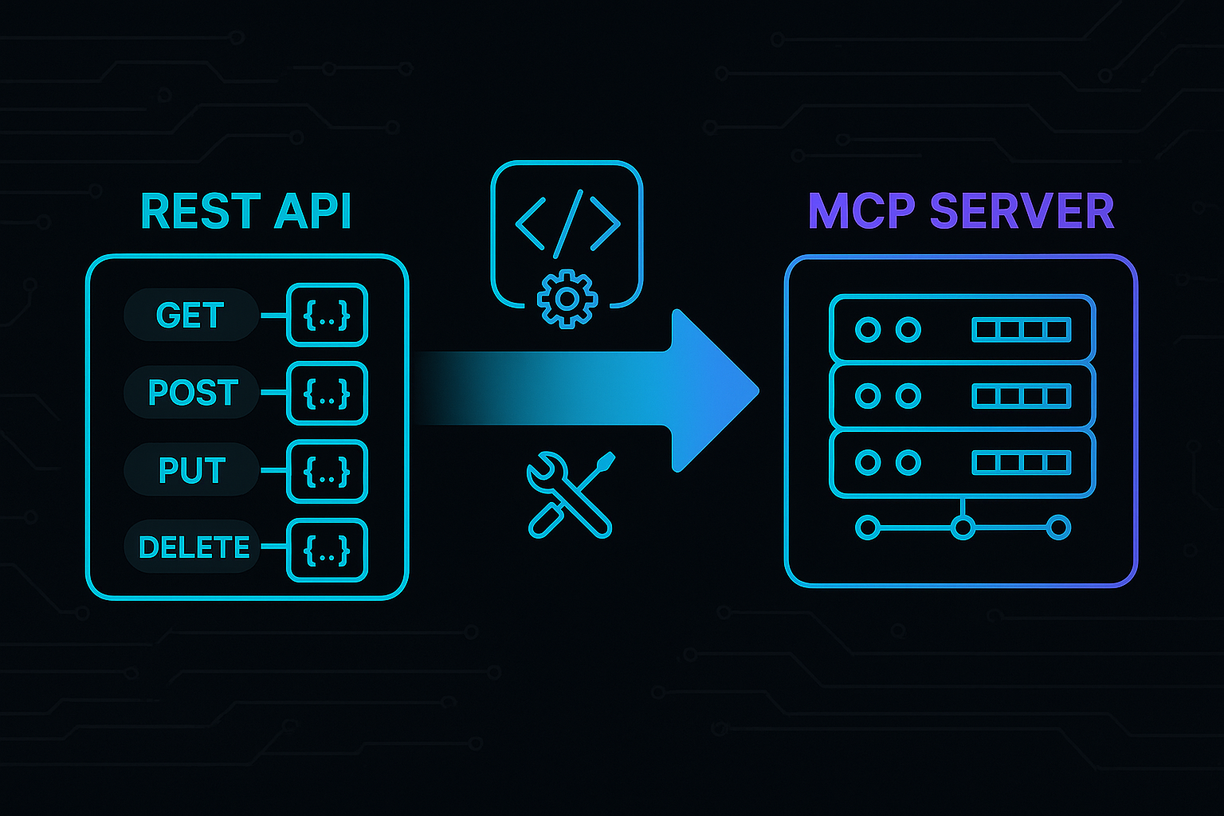
MCP (Model Context Protocol) is a standardized protocol that enables AI applications to connect with external data sources and tools. MCP allows developers to create endpoints that AI models can interact with, extending the capabilities of AI systems beyond their training data to access real-time information and perform specific actions.

contact_supportWhat is MCP playground?

An MCP playground is an interactive testing environment where developers and stakeholders can experiment with MCP endpoints in real-time. The MCP playground allows users to test API functionality, understand how MCP tools work, and experience the integration without any setup or risk to production systems.

contact_supportWhat is MCP sandbox?

An MCP sandbox is an isolated, secure environment for testing MCP server functionality. The MCP sandbox provides a controlled space where developers can explore MCP endpoints with mocked data, rate limiting, and automatic introspection without affecting live systems or requiring complex DevOps setup.

contact_supportWhy do I need MCP playground?

You need an MCP playground to accelerate learning and adoption of your MCP API. Unlike static documentation, the MCP server playground provides real-time feedback that helps prospects understand your MCP endpoints faster, bridges the gap between technical and non-technical stakeholders, and enables live demonstrations that can significantly improve your sales funnel conversion rates.

contact_supportIs the MCP server playground suitable for enterprise clients?

Yes, the MCP server playground is designed to work with enterprise clients by providing isolated, secure environments for testing MCP functionality. The MCP sandbox includes enterprise-grade features like rate limiting, proper security controls, and the ability to demonstrate complex MCP integrations that enterprise decision-makers need to see before approval.

contact_supportWhat makes MCP demo environments different from traditional API documentation?

MCP demo environments provide interactive, live experiences rather than static documentation. Your MCP server demo includes generated documentation for MCP tools, sample chat history for easier understanding, and interactive chat connected directly to your MCP tools, allowing prospects to "feel" your MCP endpoints in minutes rather than just reading about them.

contact_supportHow does MCP server sandbox help with sales and marketing?

The MCP server sandbox bridges the buyer-developer gap by letting non-technical stakeholders "see it work," which shrinks the last mile of the sales funnel. Your MCP playground allows every prospect to experience a live, no-risk demonstration, helping them understand the fit for their AI use-case and making it easier to convince decision-makers.

contact_supportWhat's the difference between an MCP demo and a playground?

An mcp demo is usually a pre-configured demonstration with limited interactivity, while a mcp playground is fully hands-on, letting users modify requests, swap datasets, and connect their own models. Additionally, prospects get comprehensive guidance on how to connect the MCP server to various clients including Claude Desktop, Gemini CLI, Amazon Bedrock, Amazon Q, and many other supported platforms.

contact_supportHow can MCP sandbox improve my product development process?

The MCP sandbox empowers your product team by providing real-time insights from how prospects use your MCP playground. This feedback allows you to refine features and MCP quality in days, not weeks, giving you valuable data about user behavior and pain points that can guide your product roadmap.

contact_supportWhat kind of insights can I get from MCP sandbox usage?

The MCP sandbox provides real-time insights into how prospects interact with your MCP tools, including which endpoints they use most, where they encounter difficulties, and what features generate the most interest. These insights help you refine your MCP server offerings and identify opportunities to improve user experience and drive more revenue.

contact_supportWho should use an MCP server demo environment?

MCP server demo environments are ideal for API companies, SaaS providers, and developers who want to showcase their MCP endpoints to prospects, stakeholders, and potential customers. Both technical teams and non-technical decision-makers benefit from the MCP demo, as it provides an accessible way to understand and evaluate MCP integration possibilities.

contact_supportHow does the MCP playground help with client integration?

The MCP playground lets prospects understand how your MCP endpoints work and allows them to plug in from any supported client. By providing hands-on experience with your MCP server, prospects can better evaluate compatibility with their existing systems and understand the integration process before committing to implementation.
Turn curiosity into successful integrations

We've built the most advanced MCP playground, so you don't have to